

The WriterZen free trial is the easy part: 15 days, no credit card, no charge when it ends.
The hard part comes after. WriterZen now sells only one-time lifetime deals, so pick wrong and you’ve paid $150 for “forever” on a tool you never properly tested.
We went through WriterZen’s pricing page, terms and sign-up flow (checked October 2026), plus recent AppSumo buyer reports.
One feature decides whether WriterZen is worth paying for, and the trial may not let you test it.
Is the WriterZen free trial still available?
Yes. WriterZen’s homepage promises a 15-day free trial with no credit card, and the sign-up form only requires your name, email and a password.
Ignore the 7-day and 21-day trials quoted around the web, including in AppSumo’s own FAQ. WriterZen’s site says 15 days, so plan around that.
How we checked: in October 2026 we reviewed WriterZen’s homepage, pricing page, terms of service and sign-up form, plus AppSumo’s WriterZen deal page and its newest reviews. We didn’t start a new trial for this update, so the sign-up screenshots below show WriterZen as of January 2024. How we review software
Last updated October 2026: trial terms and prices re-checked, and the retired monthly plans removed.
| Offer | Free trial | WriterZen direct | AppSumo code |
|---|---|---|---|
| Price | $0 | $75, $150 or $225, paid once | $79 per code, up to 5 codes |
| Length | 15 days | Lifetime licence | Lifetime licence |
| What’s included | Most tools, with caps WriterZen doesn’t publish | Depends on the tier (see the pricing table below) | The All-in-One plan, with limits per code |
| Payment | None needed | Visa, Mastercard or Amex; no PayPal | At AppSumo checkout |
| When it ends | Expires; your trial data is deleted unless you buy or export it | Nothing renews; extra seats cost $9 per seat per month | Nothing renews |
| Refund window | Nothing to refund | 21 days per the pricing page; 48 hours per the terms (updated 2021) | 60 days |
The trial limits WriterZen doesn’t publish
Here’s the catch: WriterZen doesn’t list the trial’s limits anywhere on its own site. The two snapshots we found don’t agree.
The limits WriterZen supplied to its G2 listing, last updated in October 2024, are tiny. You get one keyword lookup and one topic lookup a day, one content brief a week, 500 AI words and 500 words of plagiarism checks a day.
Allintitle and clustering checks are listed at zero. Over 15 days, that’s 15 keyword lookups and two or three briefs in total.
The trial pop-up our writer saw was more generous: 5,000 plagiarism words a day, five keyword lists and 50 member seats.
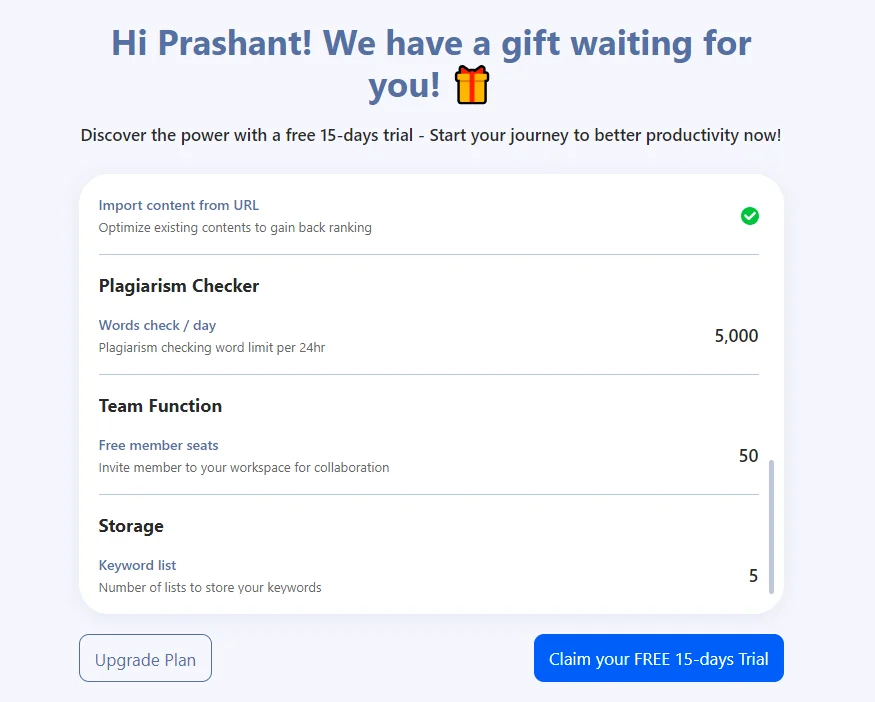
So treat that pop-up as the contract. Look for keyword credits or Allintitle checks in the list before you claim. If they read zero, you can’t test the Golden Filter, WriterZen’s signature feature.
How to claim the WriterZen free trial
Signing up takes five short steps, and none of them asks for payment details.
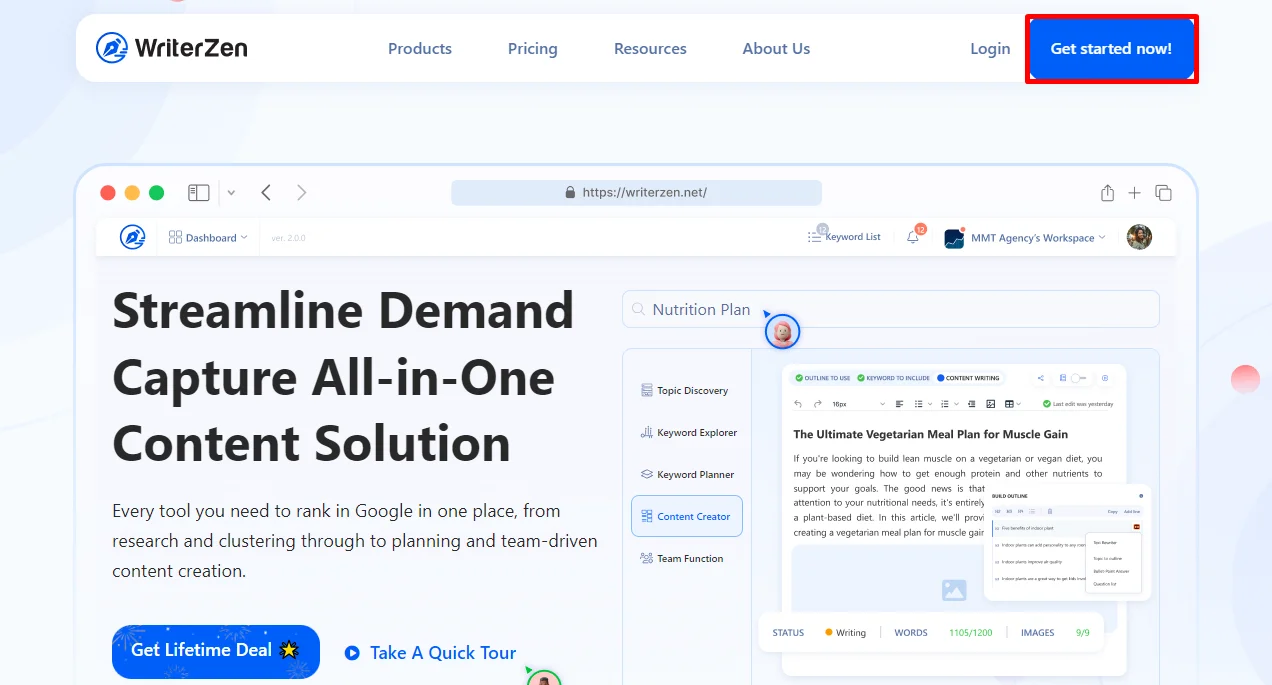
Step 1. Open WriterZen’s website and click Get started now in the top-right corner. The Start Free Trial button on the homepage opens the same form.
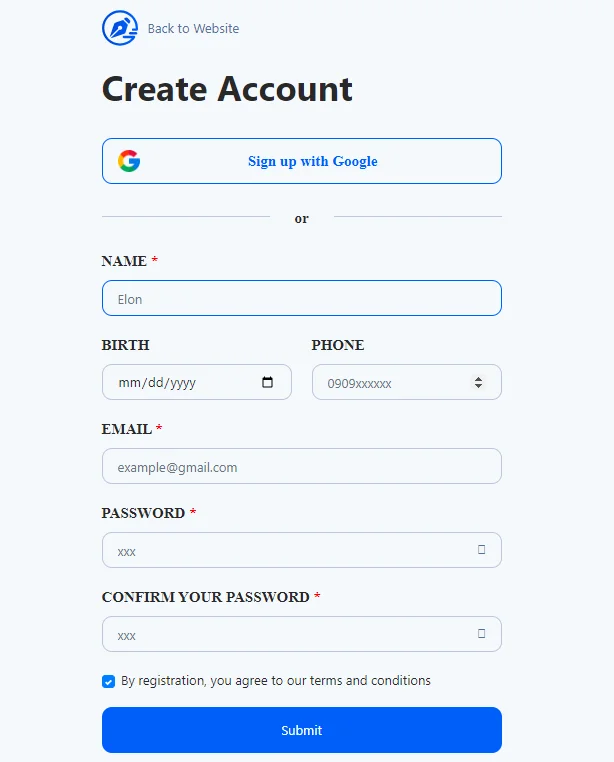
Step 2. Sign up with Google, or enter your name, email and a password. Birth date and phone are optional, and there’s no card field.
Step 3. Answer the short onboarding questions. Our writer was asked about SEO level, area of expertise, role, team size and industries.
Step 4. When the trial pop-up appears, scroll its allowance list. Then click Claim your FREE 15-days Trial rather than Upgrade Plan.
Step 5. Set a calendar reminder for day 13. That leaves two days to export your keyword lists and drafts before the trial ends and WriterZen deletes them.
What should you test before day 15?
Fifteen days on tight limits goes fast. Spend them on the four tests that tell you whether WriterZen fits your work, in this order.
- The Golden Filter. WriterZen’s Keyword Explorer counts how many pages use a phrase in their title (Google’s Allintitle data) and uses that to flag low-competition keywords. Pick two keywords you know, search Google for allintitle: plus the keyword, and compare. If Google shows pages and WriterZen says zero, stop there.
- Topic Discovery. Enter one seed topic. WriterZen builds clusters from Google Suggest and related searches, plus headline ideas from the top 20 ranking articles. Check whether it finds angles you didn’t already have.
- One real brief. Build a brief and outline for an article you actually need. The Content Creator pulls questions from Google and Reddit, and the AI assistant runs on OpenAI’s GPT-4o mini.
- Your exports. Export a keyword list and a draft before the deadline, and make sure the files open in the tools you already use.
Want a benchmark for test one? Here’s how keyword research works in Surfer SEO, a subscription tool that covers the same job.
The catch: since July 2026, buyers on AppSumo’s WriterZen page have reported that the Allintitle data has stopped working. One detailed report shows zero for every keyword, with credits still deducted. We found no public reply from WriterZen when we checked in October 2026.
That’s why the trial alone can’t settle it. If your pop-up shows zero keyword credits, you can’t run test one at all, and for many buyers test one is the reason to buy.
What happens when the WriterZen trial ends?
Nothing is charged, because WriterZen never took a card. The trial simply expires, and WriterZen’s terms say anything you created is permanently deleted unless you buy a plan or export it first.
The same terms reserve in-app, email and phone support for paying customers. Don’t count on quick help mid-trial.
What does WriterZen cost after the trial?
There’s no monthly plan to roll into anymore. WriterZen’s pricing page sells three one-time licences, and AppSumo sells the same product as stackable codes.
| Plan | One-time price | What you get | The catch |
|---|---|---|---|
| Keyword Research | $75 | 30,000 keyword credits, 50 lists, 50 keyword lookups, Golden Filter | No content, plagiarism or topic tools |
| All-In-One Basic | $150 | Adds Content Creator (50 articles a month), unlimited AI writing, plagiarism checks and topic lookups | Extra seats $9 per seat per month |
| All-In-One Advanced | $225 | 50,000 keyword credits, 100 lists, 100 lookups, 100 articles a month, 2 extra seats | Only worth it for the seats or volume |
| AppSumo, 1 code | $79 | 50 keyword and 50 topic lookups a day, 50 articles and 25,000 keyword credits a month, 2 seats | AI writing capped at 5,000 words a month |
Good to know: WriterZen’s pricing page isn’t consistent: its phone layout lists more keyword credits than the desktop table above. Before the current offer loads, the page also shows the same tiers at $135, $270 and $405. Screenshot the price and limits you’re buying.
Do the maths before you pick. AppSumo’s single code gets you the content tools for $71 less than All-In-One Basic, as long as 5,000 AI words a month is enough.
Teams should price seats first. Two extra seats on Basic cost $18 a month, or $216 a year. A three-person team recovers the $75 jump to Advanced in under five months.
Can you get your money back?
The refund rules depend on where you buy. WriterZen’s pricing page promises a 21-day money-back guarantee on the lifetime deal, claimed through a refund form.
Its terms of service, last updated in May 2021, still say refunds are only given within 48 hours of purchase. The pricing page is the newer, more specific promise, but screenshot it before you pay.
AppSumo is simpler. Its WriterZen codes are refundable for 60 days, nearly three times WriterZen’s own window, though you must redeem them within 60 days of buying.
Cancelling is mostly a non-issue, because the trial and the lifetime licence don’t renew. The only recurring charge is extra seats, and WriterZen’s terms say subscriptions are cancelled from the Unsubscribe your plan option on your profile.
Is the WriterZen trial worth starting?
Yes, as long as you treat it as a demo rather than a test. It costs nothing, so use it to learn the workflow, then judge the data inside a refund window.
Start it if: you write SEO content on a small budget and want to see whether WriterZen’s research-to-brief workflow suits you before spending $75 or more.
Skip it if: you need reliable keyword data for client work this month. Go straight to an established tool on a monthly plan; our Semrush review shows what you’d get.
Will WriterZen be around to honour your lifetime deal?
A lifetime deal is a bet that the company keeps going. Here’s what we could see when we checked in October 2026.
- WriterZen’s blog hasn’t published a new post since November 2024.
- The Knowledge link in its menu points to a help desk that no longer exists.
- AppSumo reviews posted since April 2026 are split. The 5-star ones call it a useful keyword tool for beginners; the 1-star ones say Allintitle stopped working and development has stalled.
None of that proves WriterZen is winding down. It does mean you should test it properly inside a refund window, not on trust.
Our take: the free trial is worth claiming, but the real test is a refundable purchase. For most buyers, that’s AppSumo’s $79 code and its 60-day window.
WriterZen alternatives: who should look elsewhere?
If the upkeep signals worry you, these tools cover the same jobs on a subscription or a free plan. The trials and plans below were checked in October 2026.
- Surfer SEO. Pick it if the content editor matters more than keyword data and you’d rather pay a subscription than bet on a lifetime licence. Our Surfer SEO review breaks down the plans, and our Surfer SEO free trial guide shows how to try it.
- Scalenut. Pick it if you want AI writing and SEO briefs in one subscription, with a 7-day free trial to test them. Start with our Scalenut review and Scalenut free trial guide.
- Rytr. Pick it if you only need an AI writer and $0 matters most. Its free plan needs no card, and our Rytr review covers the limits.
- Jasper or Anyword. Pick these for marketing copy rather than SEO research. Both offer 7-day free trials, covered in our guides to the Jasper AI free trial and the Anyword free trial.
WriterZen free trial FAQs
Is WriterZen free?
No. WriterZen has no free-forever plan, only the 15-day trial. What stays free is its learning material: WriterZen Academy’s online courses, its eBook guides and its webinar archive. They’re worth a look before you start the trial, so you don’t spend trial days learning the interface.
Is WriterZen legit?
Yes. WriterZen is a real product from Resonance Technology Pte Ltd, the Singapore company named in its terms of service. It has sold lifetime licences through AppSumo for years. Legit isn’t the same as well maintained, though, so read the newest AppSumo reviews before you pay.
What payment methods does WriterZen accept?
Cards. For the lifetime deal, WriterZen’s pricing FAQ lists Visa, Mastercard and American Express and says it doesn’t take PayPal. Its general billing answer also names Maestro and Discover. If a charge looks wrong, its terms give you seven business days to dispute it by email.
Can you upgrade a WriterZen lifetime plan later?
Only during a promotion, according to WriterZen. Its pricing FAQ says tier upgrades are a limited deal you can make only while the event runs. On AppSumo you can stack up to five codes, and earlier buyers can add codes to raise their limits. Buy the tier you’ll need next year.
Is Google NLP analysis included in WriterZen?
No. Google NLP credits are a separate, one-time purchase on every WriterZen plan: 60 credits cost $19, 180 cost $49 and 600 cost $149. Each article scan uses three credits, so the smallest pack covers 20 articles, about 95 cents each. Skip it unless you rely on entity analysis.
Which AI model does WriterZen use?
OpenAI’s GPT-4o mini, according to WriterZen’s product menu, and the founder’s AppSumo update confirms the switch. GPT-4o mini is OpenAI’s small, low-cost model, so treat its drafts as a starting point and edit them properly before you publish anything under your name.
Does WriterZen’s plagiarism checker catch copying from books or PDFs?
No. WriterZen’s own FAQ says the checker compares your text with Google’s index, not scholarly articles, books or PDFs. It works in 46 languages and, per the same page, doesn’t store what you check. For academic work or ebook manuscripts, use a checker built for those sources.
Can a team share one WriterZen account?
Yes, through workspace seats, with two catches. Everything members run counts against the owner’s limits, and every member can see all workspace data whatever their role. Members can also join several workspaces, which suits freelancers who write for more than one client.
How do you delete a WriterZen account and its data?
Email support@writerzen.net and ask for the account and its data to be removed. WriterZen’s terms give closed accounts a 30-day grace period to reactivate them and restore your data. They also promise permanent deletion from its servers once you ask in writing.
Our verdict: should you start the WriterZen free trial?
- Start the WriterZen free trial if you want to see the workflow, because it costs nothing and asks for no card.
- Buy the AppSumo code if you’re serious about WriterZen, because 60 days gives you time to check the Golden Filter against Google and get your $79 back if it fails.
- Buy direct from WriterZen if you need unlimited AI writing or Advanced’s extra seats, because the AppSumo code caps AI at 5,000 words a month. Screenshot the 21-day refund promise first.
- Pick Surfer SEO or Semrush instead if you’ll rely on the tool for years, because a subscription you can cancel is a smaller bet than a licence tied to WriterZen’s future.
Our pick for most readers: claim the free trial to learn the workflow, then do the real test inside AppSumo’s 60-day window before you trust WriterZen with client work.



[…] month (checked October 2026). A lifetime deal is only as good as the company behind it, so read our WriterZen free trial guide first. Semrush Pro+ users should test its content optimization before adding […]