


To do keyword research in Surfer SEO, open Keyword Research, type one seed keyword, pick a country and create the report. Surfer groups related searches into clusters with volume, difficulty and intent.
The catch is the plan. You need Standard at $99 a month billed yearly ($119 month to month) or higher, because Discovery at $49 leaves Keyword Research out.
Any cluster then turns into a Content Editor brief in one click, and that’s the step that uses your plan’s documents.
We checked Surfer’s Keyword Research guide, the pricing table and the Content Editor docs on November 12, 2026, and kept the real screenshots from our own 2023 account.
Below: the steps, how to read a cluster, and the habit that saves most of your documents.
What do you need before you start?
- A plan that includes it. Standard, Pro and Peace of Mind include Keyword Research. Discovery and AI Search Analytics don’t, per Surfer’s pricing page.
- One seed keyword. A broad topic works best, like “grow on YouTube” rather than a full blog title.
- Your target country. Volumes and ranking pages change by location, so pick the market you actually want traffic from.
- A spare document or two. Running the research is planning. The document gets used when you turn a cluster into a Content Editor.
New to Surfer? The Surfer SEO free trial gives you 7 days of Pro, and Surfer’s trial help article lists Keyword Research among the included tools.
A card is required, and the trial converts to a paid plan unless you cancel.
| Plan | Price (billed yearly) | Monthly billing | Keyword Research | Topical Map |
|---|---|---|---|---|
| Discovery | $49/mo | $59/mo | No | No |
| Standard | $99/mo | $119/mo | Yes | No |
| Pro | $182/mo | $219/mo | Yes | Yes |
| Peace of Mind | $299/mo | $359/mo | Yes | Yes |
How we checked: We read Surfer’s Keyword Research, Content Editor, Topical Map and trial docs plus the plan comparison table on November 12, 2026.
The screenshots come from our Surfer account in July 2023, so a few labels may look different today.
We didn’t run new reports for this update.
We cut the old “Create for 1 CE credit” step because Surfer now calls the button “Create Content Editor” and counts documents, not credits. How we review software
Some links on this page are affiliate links. If you buy through them, we may earn a commission at no extra cost to you. It never changes our scores. How we make money.
How to do keyword research in Surfer SEO, step by step
- Open Keyword Research. Surfer’s Topical Map guide says Keyword Research and Topic Research now sit in the dashboard as separate tools.
- Enter one seed keyword. In our account the field accepted one keyword per report.
- Pick the location. Use the country you want to rank in, not the one you live in.
- Create the report. Surfer scans the top Google results for that keyword and clusters the terms those pages rank for.
- Filter the clusters by search intent, search volume or keyword difficulty.
- Open a cluster to see its main keyword, sub-keywords and the Content Score benchmark.
- Click Create Content Editor on the cluster you want to write. That builds the brief and uses one document.
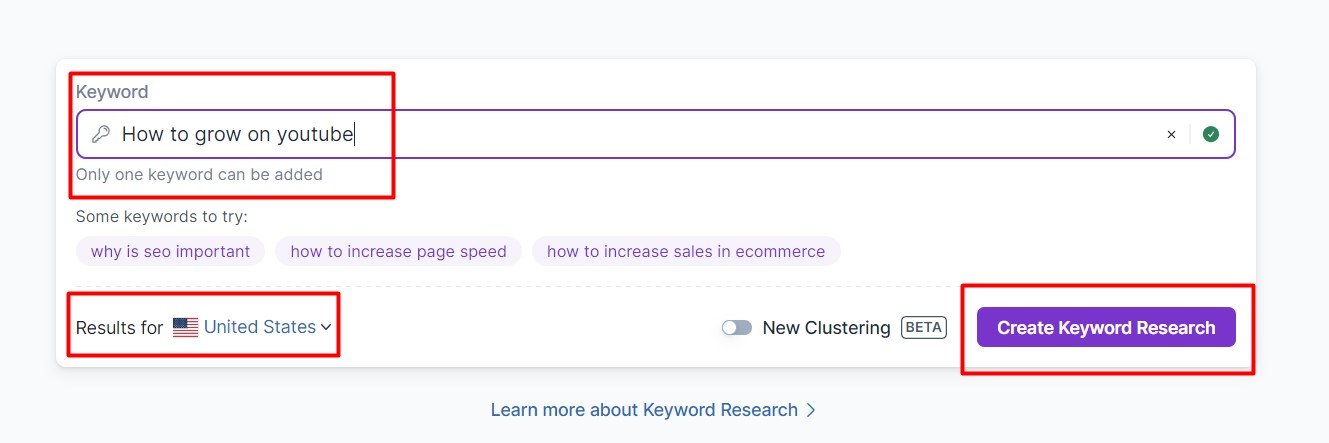
Surfer needs a moment to build the report. Start broad, then run a second report on the most promising cluster’s main keyword if you want more depth.
Step 7 hands you over to the editor. Our guide to the Surfer SEO Content Editor covers what happens next, from the deep analysis to the Content Score.
How do you read Surfer’s keyword clusters?
Every card in the report is a cluster: a group of searches that the same pages rank for. Treat one cluster as one page. Two clusters about the same thing can share a page.
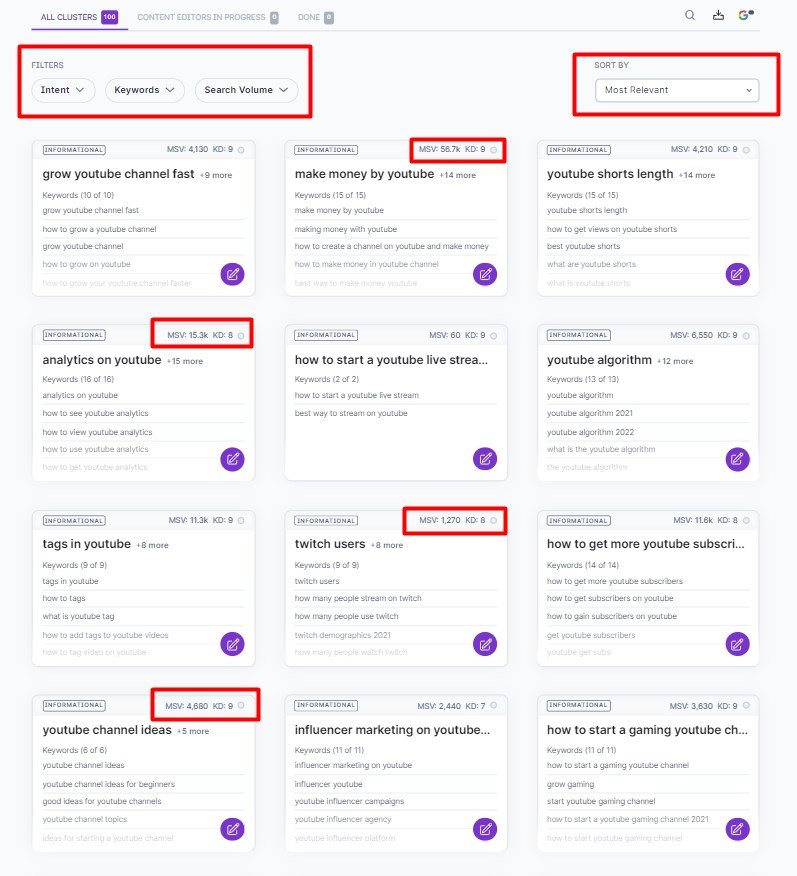
- Main keyword: the anchor term for the cluster. It’s usually the H1 and the focus keyword of the page you write.
- Search intent: informational, commercial or navigational. A “how to” cluster wants a guide, not a sales page.
- Sub-keywords: the other searches the ranking pages also catch. Use them as H2s and FAQ questions instead of stuffing them in.
- Search volume (MSV): a 12-month average from Surfer’s data partners, so seasonal topics look flatter than they are.
- Keyword difficulty (KD): how hard the top results will be to beat. Lower is easier.
- Content Score benchmark: the average optimization score of the pages already ranking. It tells you how high the bar is.
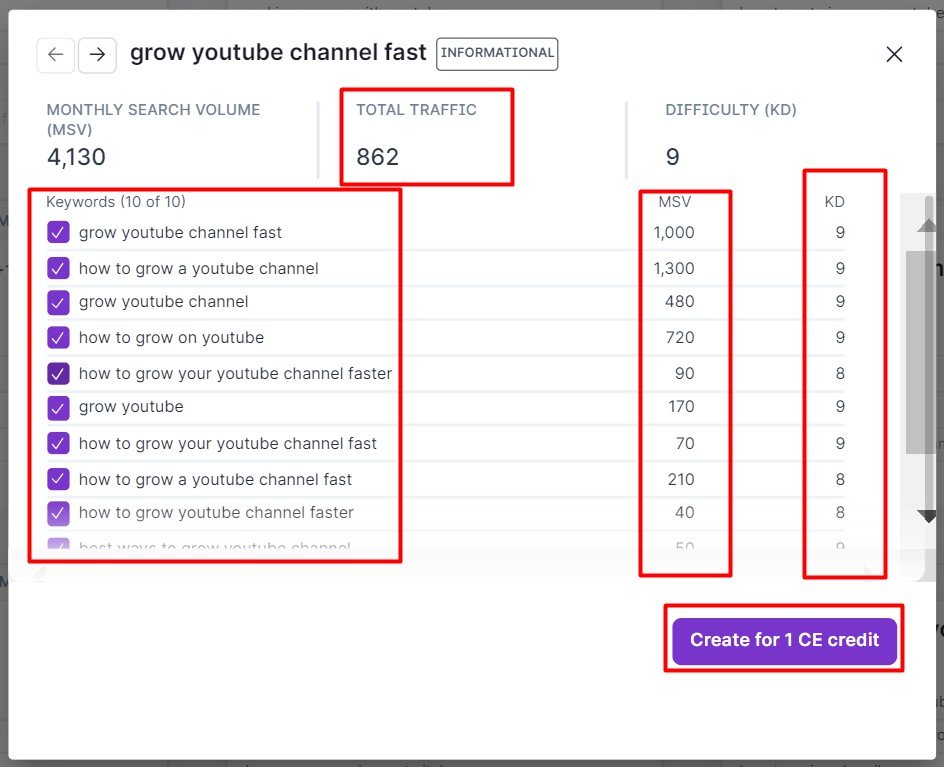
In the example above, “grow youtube channel fast” has a combined volume of 4,130 and difficulty 9 in our 2023 report. Ten close variants sit underneath it, and you can untick the ones you don’t want in the brief.
Which cluster should you write about first?
Sorting by volume is the obvious move and usually the wrong one. A big cluster with high difficulty can eat a month of work and still sit on page three.
- Match intent to the page. Only pick clusters whose intent fits what you can publish: guides for informational, comparisons for commercial.
- Start with low difficulty. On a young site, filter to the easier end first and build up.
- Check the Content Score benchmark. A low benchmark means the ranking pages are thin, which is your opening.
- Group near-duplicates. If two clusters would produce the same article, merge them into one page so you don’t compete with yourself.
- Look at your own site. If you already have a page on the cluster, update it rather than writing a new one.
That last point matters more than any number.
Surfer’s Pro plan adds a Cannibalization Report for exactly this, per the pricing table. On Standard, search your own site and Search Console before you write.
On WordPress, your SEO plugin helps with the on-page side; our Rank Math review covers its checks, and our Yoast SEO alternatives compare the other plugins.
Keyword Research, Topical Map or Keyword Surfer: which one do you need?
Surfer has three research tools, and people mix them up. They answer different questions.
- Keyword Research starts from one keyword you type. It works for a brand-new site because it doesn’t need your data. Standard and up.
- Topical Map starts from your domain. It reads Google Search Console, maps what you already cover and suggests gaps, and refreshes every 14 days. Pro and Peace of Mind only, per the Topical Map guide.
- Topic Research is the no-GSC version of that map for a topic outside your current niche.
- Keyword Surfer is the free Chrome extension. It adds search volume and keyword ideas to Google results, with data from 70 countries, and needs no plan.
Surfer’s own Topical Map FAQ tells smaller or newer domains to run Keyword Research first, because the map depends on Search Console data you may not have yet.
Fair to the free route: if you publish a few posts a month, Keyword Surfer plus Google’s own suggestions may be enough. The paid tool earns its keep when you plan dozens of pages and want them clustered for you.
What mistakes waste documents in Surfer keyword research?
Mistake 1: one Content Editor per keyword. Sub-keywords in a cluster belong on the same page. Splitting them burns documents and splits your rankings.
Mistake 2: ignoring intent. A commercial cluster written as a tutorial rarely ranks, however high the Content Score.
Mistake 3: the wrong country. A US report for an India-focused blog sends you after volumes your readers don’t search.
Mistake 4: treating MSV as traffic. Volume is a yearly average of searches. Even on page one you only get a share of those clicks.
Each Content Editor counts as one usage against your plan, according to Surfer’s Content Editor docs. Standard and Pro include 360 documents, Discovery 120. If you let Surfer AI write the draft, it still uses a document.
Don’t let any tool write the whole post for you, either. We explain why in how AI-written content can hurt your SEO.
Is Surfer’s keyword research better than Semrush or WriterZen?
It’s better at one thing: turning a topic into ready-to-write clusters that drop straight into Surfer’s editor. It doesn’t try to be a backlink database.
If you need competitor traffic and backlinks, see our Semrush review. For another keyword tool to compare, our WriterZen free trial guide shows what its 15-day trial includes.
Want an AI writer with research built in instead? Our Scalenut review covers another AI SEO writer, and our Scalenut free trial guide explains its 7-day trial. Our full Surfer SEO review covers the rest of the Surfer platform.
Surfer SEO keyword research FAQs
Is keyword research included in every Surfer plan?
No. Surfer’s pricing table lists Keyword Research on Standard, Pro and Peace of Mind only. Discovery at $49 a month billed yearly and the AI Search Analytics plan leave it out, so check your plan before you count on it for content planning.
Can I do Surfer SEO keyword research for free?
Partly. The Keyword Surfer Chrome extension is free and shows search volume and keyword ideas inside Google results. The clustered Keyword Research tool needs a paid Standard plan or higher, or the 7-day Pro trial, which asks for a card and converts unless you cancel.
Does running keyword research in Surfer use a document?
Surfer’s docs only say that each created Content Editor counts as one usage. We found no statement that a Keyword Research report itself uses a document. The cost lands when you click Create Content Editor on a cluster, so pick clusters carefully.
How accurate is Surfer’s search volume?
It’s an estimate. Surfer says monthly volumes come from its data partners and show the average of the past 12 months. That smooths out seasonal spikes, so a Black Friday or exam-season keyword can look smaller in the report than it is in its peak month.
What is the difference between Keyword Research and Topical Map in Surfer?
Keyword Research starts from one keyword you type and works for any site. Topical Map starts from your domain, uses Google Search Console data to find gaps and refreshes every 14 days. Topical Map is only on Pro and Peace of Mind plans.
How many keywords can one Surfer Content Editor target?
Up to 20 keywords per editor, according to Surfer’s Content Editor docs. In practice one main keyword plus the cluster’s sub-keywords is enough. Adding unrelated keywords to one editor muddles the guidelines and makes the target Content Score harder to hit.
Which countries does Surfer keyword research support?
You choose a target location when you create a report. Surfer’s Keyword Research guide doesn’t publish a country count. The 70-country figure belongs to the free Keyword Surfer extension, and Topical Map supports 23 countries, including the US, UK, Canada, Australia and India.
Should you use Surfer for keyword research?
Use Surfer if you already pay for Standard or higher and write in Surfer’s editor. The clusters save the sorting work and hand a ready brief to the Content Editor, which is where the real value sits.
Skip the upgrade if Keyword Research is the only reason. On Discovery, start with the free Keyword Surfer extension and see whether you actually miss the clusters.




[…] your keyword before you start. Our guide to keyword research in Surfer SEO shows how Surfer’s own tool works, though it needs Standard or higher. The Content […]
[…] a benchmark for test one? Here’s how keyword research works in Surfer SEO, a subscription tool that covers the same […]
[…] Need keyword ideas: no SEO plugin replaces research. Start with our guide to keyword research in Surfer. […]
[…] text that can hardly give you rank, it offers you an SEO-guided dashboard where you can do keyword research in Surfer SEO, and an SEO audit, and create the content using the guidelines that are […]