


The Surfer SEO free trial gives new accounts 7 days of the Pro plan for free. You enter a card and pick a plan at sign-up, and the trial turns into that paid plan on day 7 unless you cancel.
That’s the catch. Surfer’s own help article says “the trial does not cancel automatically”, and Pro costs $182 a month billed yearly. Forget the date and you could be charged for a full year.
We read Surfer’s trial help article, pricing page and FAQ on November 10, 2026. Below: how to claim it, what to test, and how to cancel in time.
There’s also a way to cancel on day one and still keep all seven days.
Is the Surfer SEO free trial still available?
Yes. Surfer’s trial help article, updated November 6, 2026, says new accounts get full access to the Pro plan for 7 days at no charge.
- Length: 7 days.
- Plan: Pro, with AI visibility tracking, Content Audit, keyword research, AI writing and MCP access.
- Card needed: yes. You choose the plan you’ll move to and enter billing details at checkout.
- Who qualifies: new accounts only. A card that was ever on another Surfer account isn’t eligible.
- After day 7: your card is charged for the first billing period of the plan you chose.
How we checked: We read Surfer’s trial help article, its pricing page and the pricing FAQ on November 10, 2026. We didn’t start a new trial for this update, so the steps come from Surfer’s documentation.
Older versions of this page mentioned a 7-day refund and a $49 starting price. Neither appears on Surfer’s pricing page today, so we removed them. How we review software
Some links on this page are affiliate links. If you buy through them, we may earn a commission at no extra cost to you. It never changes our scores. How we make money.
How do you claim the Surfer SEO free trial?
- Go to Surfer’s pricing page and click Start for Free on the plan you’d keep after the trial.
- Create your account with an email address you haven’t used on Surfer before.
- Pick monthly or yearly billing. Choose monthly if you’re unsure: yearly is charged in full on day 7.
- Enter your card details and select Start my trial. To pay straight away instead, choose Skip trial and buy now.
- Put a reminder in your calendar for day 6.
What should you test before day 7?
Seven days goes fast. Test the features you’d actually pay for, on real pages from your own site.
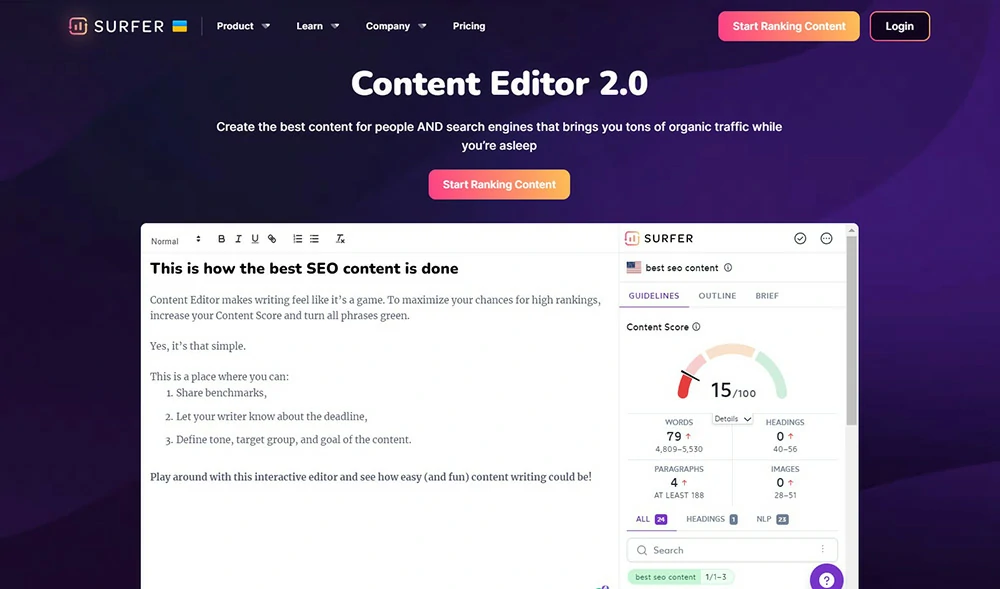
The Content Editor on a live article
Open an existing post that ranks on page two, paste it into the Content Editor and work through the guidelines. Our Surfer Content Editor walkthrough shows which suggestions matter and which to ignore.
One Surfer AI draft
Generate one article with Surfer AI and time how long the edit takes. Surfer’s guide says generation takes 5 to 20 minutes. Our Surfer AI explainer covers the settings that make drafts less generic.
Keyword research and Topical Map
Build one topic cluster for your niche. Our guide to keyword research in Surfer SEO walks through it step by step.
Content Audit and AI visibility tracking
Connect your site and check whether Content Audit flags pages you already knew were weak. Add a few prompts to the AI tracker and see whether your brand shows up in ChatGPT or Google’s AI answers.
What happens when the Surfer trial ends?
If you do nothing, your subscription starts and your card is charged for the plan you chose at checkout. Monthly plans bill one month. Yearly plans bill the whole year up front.
To cancel, Surfer’s help article gives these steps:
- Log in to your Surfer account.
- Go to Settings, then Billing, then Your subscription.
- Click Cancel subscription in the bottom-right corner and confirm.
Here’s the useful part: you can cancel right after you sign up and still use the trial until it ends.
The downside is that your account then expires, and you lose any data you stored. Export anything you want to keep first.
No refund promise: Surfer’s pricing page and FAQ don’t mention a refund or money-back guarantee. The FAQ says cancelling stops the next renewal, and you keep access until the end of the period you’ve paid for.
Treat the trial as your only risk-free window.
How much does Surfer cost after the trial?
| Plan | Price (billed yearly) | Documents | Best for |
|---|---|---|---|
| Discovery | $49/mo | 120 | Solo bloggers testing the waters |
| Standard | $99/mo | 360 | Small content teams |
| Pro (trial plan) | $182/mo | 360 | Teams tracking AI visibility daily |
| Peace of Mind | $299/mo | Unlimited (fair use) | Agencies needing API access |
The trial runs on Pro, but you don’t have to stay on it. Surfer’s help article says support can change the plan your trial converts to. Discovery is the cheapest way to keep the Content Editor.
Is the Surfer SEO trial worth starting?
Yes, if you publish search-led content every week and want to see whether Surfer’s guidelines move your rankings. Seven days of Pro is enough to optimize three or four existing posts and judge the editor.
No, if you only need occasional checks. Surfer’s free tools may be enough: an AI detector and an AI humanizer on its website, plus the Chrome extension.
Our full Surfer SEO review covers the features beyond the trial. Our advice: don’t buy a yearly plan until you’ve used Surfer for at least a month.
Surfer alternatives: who should look elsewhere?
- You want a trial with no card: see our WriterZen free trial guide.
- You mainly need AI copy, not SEO scoring: our Anyword free trial guide and Jasper AI free trial guide compare the writing-first tools.
- You want SEO briefs on a smaller budget: read our Scalenut free trial guide.
- You need backlinks and rank tracking: our Semrush review covers a broader SEO suite.
Whichever you pick, don’t publish AI text unedited. Here’s why raw AI content can break your site.
Surfer SEO free trial FAQs
How long is the Surfer SEO free trial?
Seven days. Surfer’s help article, updated November 6, 2026, says new accounts get full access to the Pro plan for 7 days. After that, the plan you picked at checkout starts and your card is charged.
Does the Surfer free trial need a credit card?
Yes. You choose a plan and enter billing details at checkout before the trial starts. Surfer accepts credit and debit cards for monthly and yearly plans, and bank transfer for yearly plans only. It doesn’t accept PayPal.
Can I cancel the Surfer trial without being charged?
Yes. Go to Settings, Billing, Your subscription and click Cancel subscription before day 7 ends. You keep access until the trial finishes, then your account expires and its stored data is deleted.
Does Surfer offer a refund after the trial?
Surfer’s pricing page and FAQ don’t mention a refund or money-back guarantee as of November 10, 2026. Cancelling stops the next renewal, but you keep paying for the period you’ve started. Ask support before you buy if a refund matters to you.
Can I get a second Surfer free trial?
Not normally. The trial is for new accounts, and a card that was registered on a Surfer account before won’t qualify. Surfer says returning users can contact support at support@surferseo.com or via live chat.
Which plan does the Surfer trial give you?
Pro, which costs $182 a month billed yearly. It includes AI visibility tracking, Content Audit, keyword research, AI writing and MCP access. You can ask support to switch the plan your trial converts to, such as Discovery at $49.
Is there a free version of Surfer SEO?
There’s no free plan of the main app. Surfer offers a free AI detector, a free AI humanizer and a Chrome extension on its website. The Content Editor, Surfer AI and Content Audit need a paid plan or the trial.
Can I skip the trial and pay straight away?
Yes. At checkout, choose Skip trial and buy now instead of Start my trial. That makes sense only if you’ve used Surfer before and already know which plan you need.
Our verdict: should you start the Surfer SEO free trial?
Start it if you have three or four real posts ready to optimize and can set a day-6 reminder. Pick monthly billing at checkout so a missed cancellation costs one month, not a year.
Skip it if you only want AI drafts. A writing tool is cheaper, and our Surfer AI guide explains what you’d be paying for.



[…] accounts can test Pro free for seven days with a card on file (Surfer’s trial rules). Our Surfer SEO free trial guide walks through the […]
[…] to Surfer? The Surfer SEO free trial gives you 7 days of Pro, and Surfer’s trial help article lists Keyword Research among the […]
[…] billing details and it doesn’t cancel automatically. Standard is $99/mo billed yearly. Our Surfer SEO free trial guide has the cancel […]